1
Have KSP installed
Make sure Kerbal Space Program is already downloaded and installed before continuing.
2
Download CKAN and place it in your KSP folder
Download CKAN, unzip it, then drop
ckan.exe directly into your KSP install folder.
3
Launch CKAN instead of KSP and add your game instance
Open
ckan.exe, then go to File > Manage Game Instances > New Game Instance > Add Instance to CKAN. Browse to your KSP launcher, usually KSP_x64, and open it.
4
Critical step: install Dark MultiPlayer 3.8.5
In CKAN, search for
Dark MultiPlayer, install it, then apply and update that mod to version 3.8.5. This is the only required gameplay mod for connecting.
5
Optional: import the approved server mod pack
Download Server Modpack, unzip it, and import the included
Server Modpack.ckan into CKAN. This approved pack includes Outer Planets, Promised Worlds, Dark MultiPlayer, and additional visual enhancements.
6
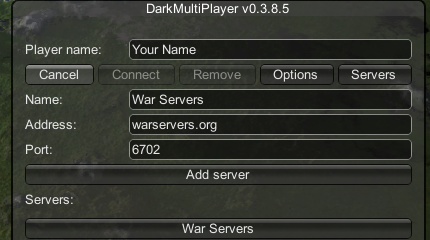
Launch from CKAN and enter the server info
Start the game from CKAN, then enter the Dark MultiPlayer server details exactly like this: server address
warservers.org and port 6702. For a connection example, click example.
Important: the critical requirement is
Dark MultiPlayer 3.8.5. The optional server mod pack is recommended for approved content and visuals, but the core connection requirement is DMP.